Robot Making & Robotics Basics
The practical bridge from circuits to autonomous robots: the 5 robot subsystems, choosing your first microcontroller board (Arduino vs ESP32 vs Pico), first steps in code, DC motor driver wiring (L298N/TB6612), mechanical chassis and M3 hardware, essential beginner sensors, Sense-Think-Act control loops, wireless control, Tinkercad/Wokwi simulation, diagnostic debugging, and builder buying guides.
All Guides in Robot Making & Robotics Basics
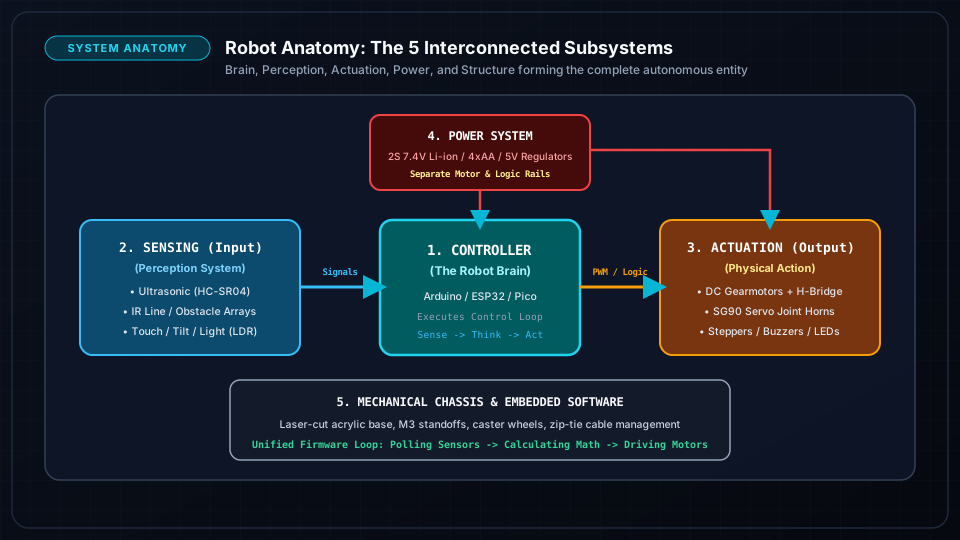
Robot Anatomy: The 5 Essential Subsystems & How They Connect
Understand how every robot works from the ground up: Controller (Brain), Sensors (Nervous System), Actuators (Muscles), Power (Circulatory System), and Chassis (Skeleton).
Every autonomous robot consists of 5 unified subsystems: Controller, Sensing, Actuation, Power, and Chassis/Mechanics.
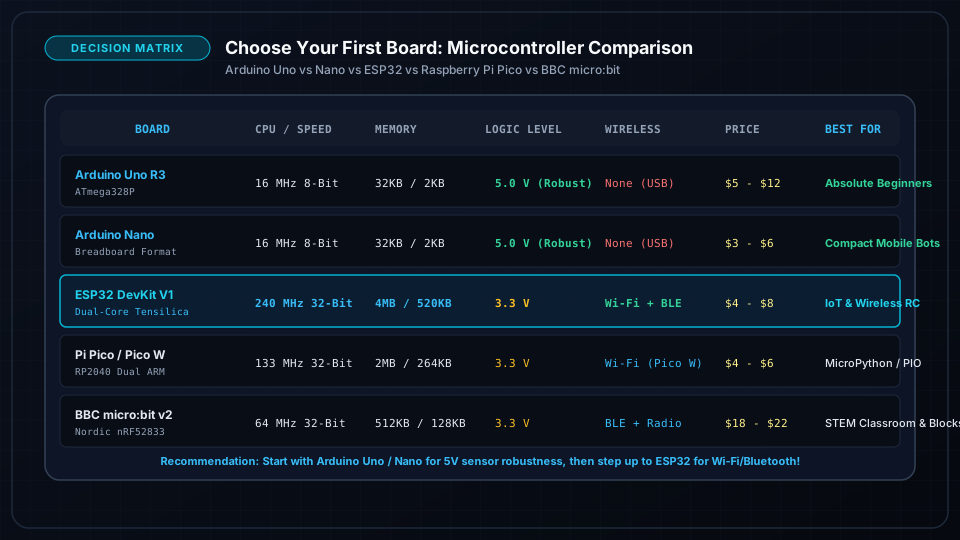
Choose Your First Robotics Board: Arduino Uno vs Nano vs ESP32 vs Pi Pico vs micro:bit
Find the perfect brain for your robot. Comprehensive comparison matrix of Arduino Uno, Nano, ESP32, Raspberry Pi Pico, and BBC micro:bit by clock speed, logic voltage, GPIO, and pricing.
Arduino Uno/Nano (ATmega328P) is the ultimate beginner platform due to indestructible 5V logic, massive community tutorials, and breadboard convenience.
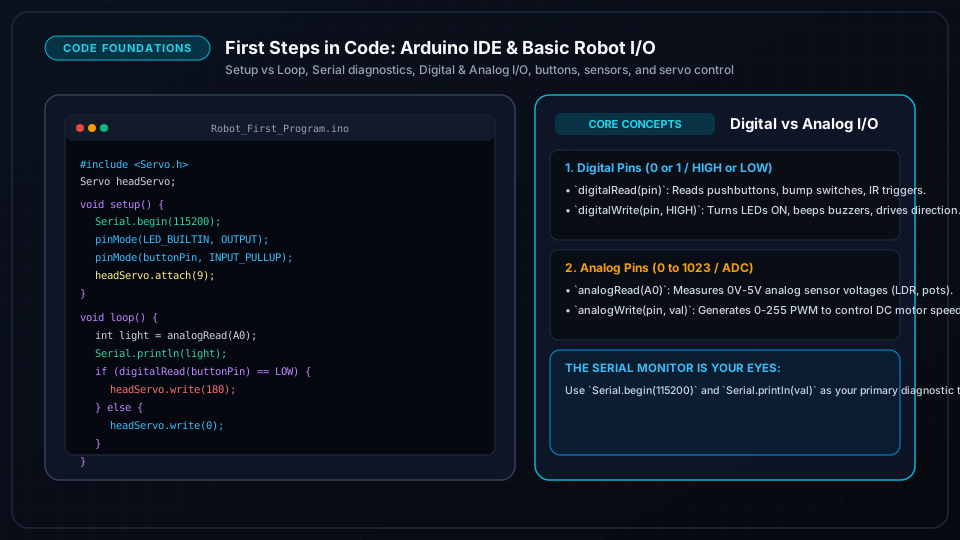
First Steps in Code: Arduino IDE & Wokwi Setup, Blink, Serial, I/O & Sensors
Master the fundamental building blocks of robotics programming: Arduino IDE setup, Wokwi simulation, Digital vs Analog I/O, reading buttons, measuring sensors, and driving buzzers and servos.
Arduino programs are composed of two mandatory functions: setup() (runs once on boot) and loop() (repeats infinitely).
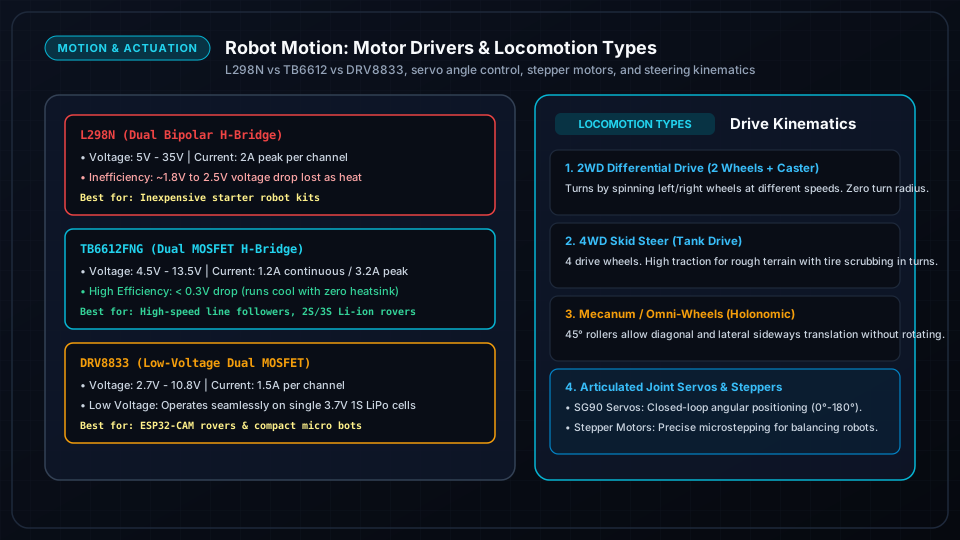
Robot Motion: DC Motors, Driver Wiring (L298N vs TB6612 vs DRV8833) & Locomotion
Master robot propulsion: H-Bridge principles, hands-on wiring for L298N, TB6612FNG, and DRV8833 drivers, PWM speed control, and comparison of Differential, 4WD Skid, Tracked, and Omni locomotion.
An H-Bridge circuit uses 4 electronic switches (MOSFETs/BJTs) to reverse polarity across a DC motor, enabling Forward, Reverse, and Brake.
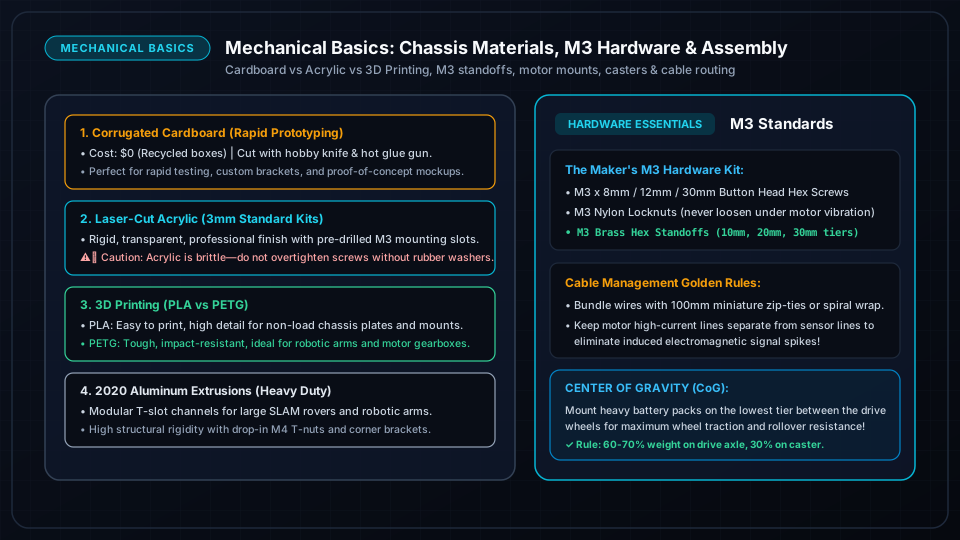
Mechanical Basics: Chassis Materials, M3 Hardware, Standoffs, Motor Mounts & Cable Management
Build strong, reliable robot frames: comparing cardboard, acrylic, 3D printing, and aluminum; mastering metric M3 fasteners, standoffs, motor mounting brackets, and clean cable routing.
Cardboard and foamcore are unbeatable for rapid 10-minute prototyping; laser-cut acrylic is great for flat plates; 3D printing (PLA/PETG) allows custom integrated sensor brackets.
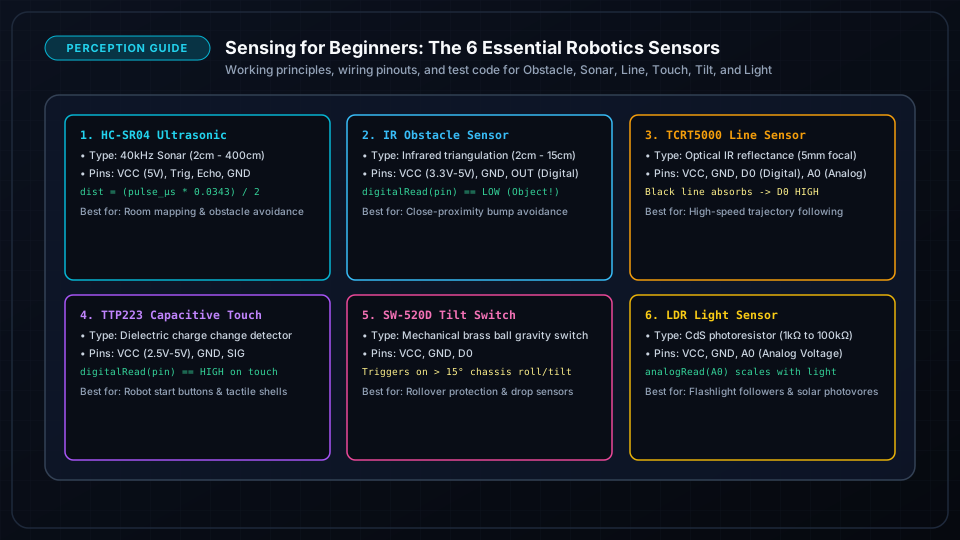
Sensing for Beginners: Ultrasonic, IR Obstacle, Line Tracking, Touch, Tilt & Light
Give your robot senses: comprehensive guide to working principles, pinouts, wiring diagrams, and Arduino C++ code for Ultrasonic, IR obstacle, Line reflectance, Touch, Tilt, and Light sensors.
The HC-SR04 Ultrasonic sensor calculates distance using speed of sound in air (343 m/s) with formula: Distance = (Time × 0.0343) / 2.
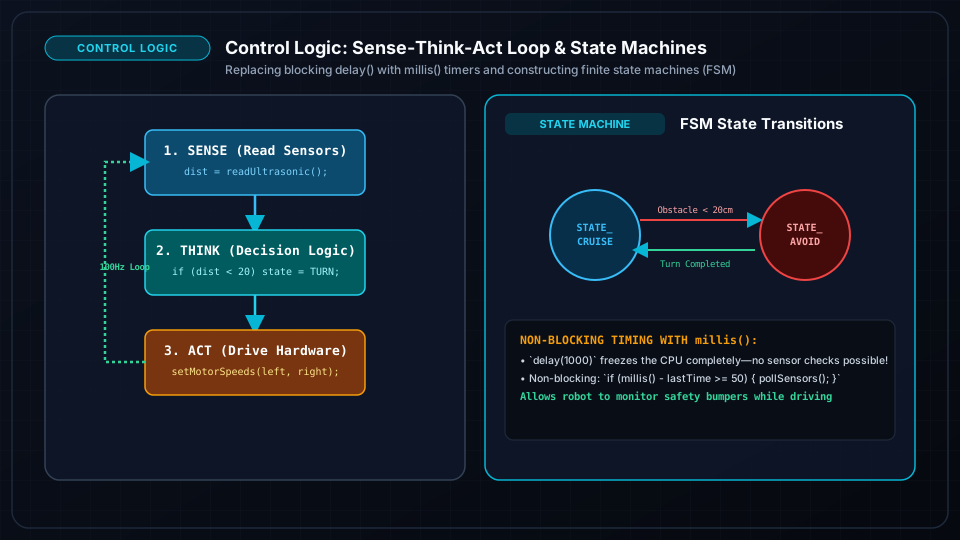
Control Logic: Sense-Think-Act Loop, Non-Blocking Timing (millis) & State Machines
Stop using delay() and write intelligent robotics software: master the Sense-Think-Act paradigm, non-blocking asynchronous timing with millis(), and Finite State Machines (FSMs).
The delay() function freezes the CPU completely; during a delay(2000), a robot cannot read bump switches, measure ultrasonic distance, or respond to stop commands.
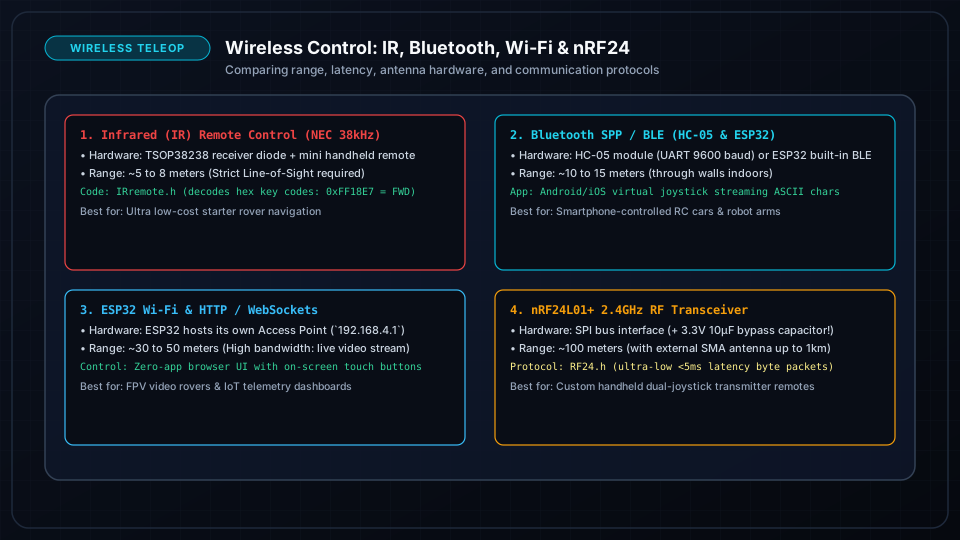
Wireless Robot Control: IR Remote, Bluetooth (HC-05/BLE), ESP32 Wi-Fi & nRF24L01+
Untether your robot: step-by-step wireless guide covering Infrared (IR) TV remotes, Bluetooth serial smartphone control, ESP32 Wi-Fi Web Joystick interfaces, and long-range nRF24L01+ 2.4GHz transceivers.
Infrared (IR) control is cheap ($1) and simple, but requires line-of-sight and is sensitive to bright ambient sunlight.
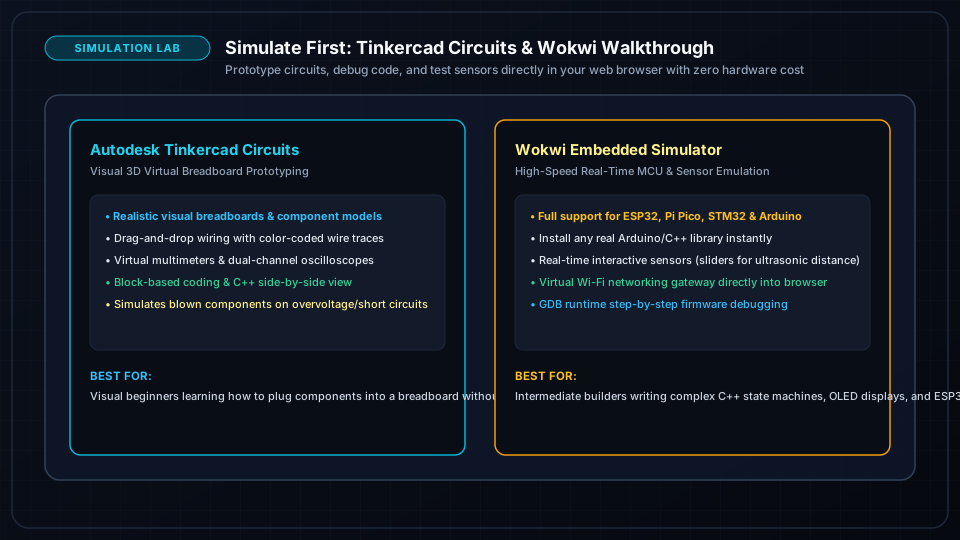
Simulate First: Tinkercad Circuits & Wokwi Online Robotics Walkthroughs
Test before you solder: step-by-step walkthrough of Tinkercad Circuits and Wokwi. Build virtual Arduino and ESP32 circuits, debug C++ firmware, test sensors, and verify motor logic with zero hardware cost.
Circuit simulators prevent costly mistakes: you can test high-voltage wiring, check logic levels, and debug code without frying real chips.
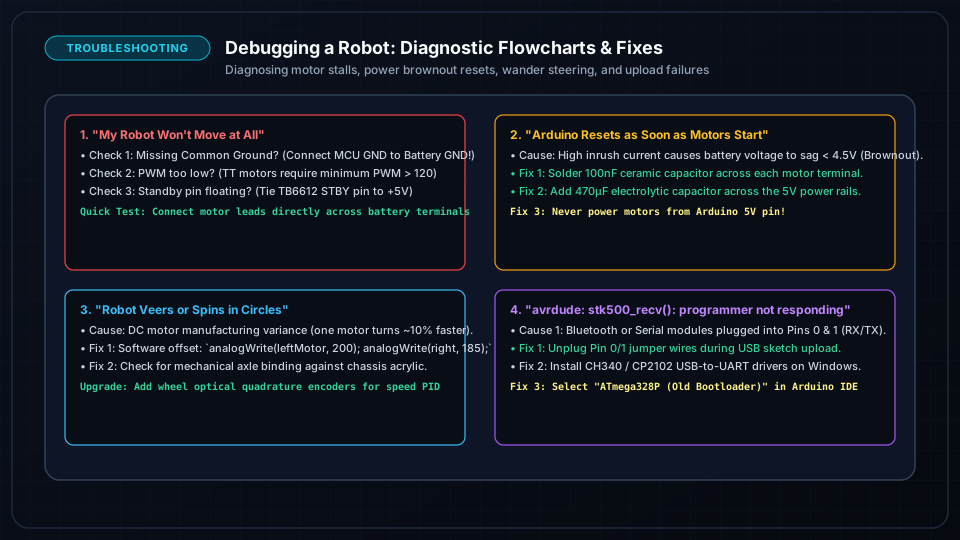
Debugging a Robot: Brownouts, Motor Stalls, Spinning in Circles & Upload Errors
Step-by-step diagnostic decision trees to solve the 4 most common robot failures: code upload errors, brownout reboot loops on motor start, spinning in circles, and noisy sensor glitches.
Never change multiple variables at once; isolate software, logic wiring, and power distribution systematically.
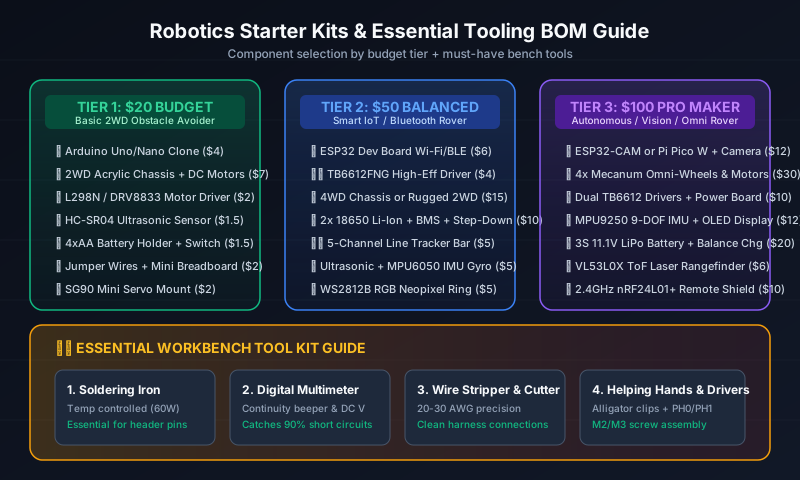
Robotics Buying Guide: $20 / $50 / $100 Starter Kit BOMs & Essential Workbench Tools
Smart spending guide for robotics makers: complete Bill of Materials (BOM) with part costs for $20 Budget, $50 Intermediate, and $100 Pro Kits, plus must-have workbench tools (soldering iron, multimeter, strippers).
Avoid all-in-one proprietary closed kits; buying open modular hardware components teaches transferable real-world robotics engineering.