Key Engineering Takeaways
- •The delay() function freezes the CPU completely; during a delay(2000), a robot cannot read bump switches, measure ultrasonic distance, or respond to stop commands.
- •The Sense → Think → Act loop decouples input acquisition, decision logic, and actuator commands into clean, modular cycles.
- •millis() returns the number of milliseconds since boot, enabling multi-tasking and asynchronous timers without blocking execution.
- •Finite State Machines (FSMs) structure complex robot behaviors into discrete states (e.g. CRUISE, OBSTACLE_DETECTED, REVERSE, TURN_SEARCH) connected by clear transition rules.
- •Using C++ enum classes and switch-case statements makes robotics code self-documenting, bug-free, and easy to expand.
- • Basic C++ programming (if/else statements, functions)
- • Any Arduino / ESP32 rover platform with ultrasonic or IR sensors
Why delay() Breaks Autonomous Robots
When a beginner writes:
// BAD BLOCKING CODE
moveForward();
delay(3000); // Drive forward for 3 seconds
turnLeft();
delay(1000); // Turn for 1 second
During those 3 seconds of delay(3000), the microcontroller is completely blind and frozen in time. If a child walks in front of the robot or a wall is approached at second 1, the robot cannot check its sensors and will crash at full speed.
In robotics, your main loop() must execute at least 50 to 200 times per second without ever stopping!
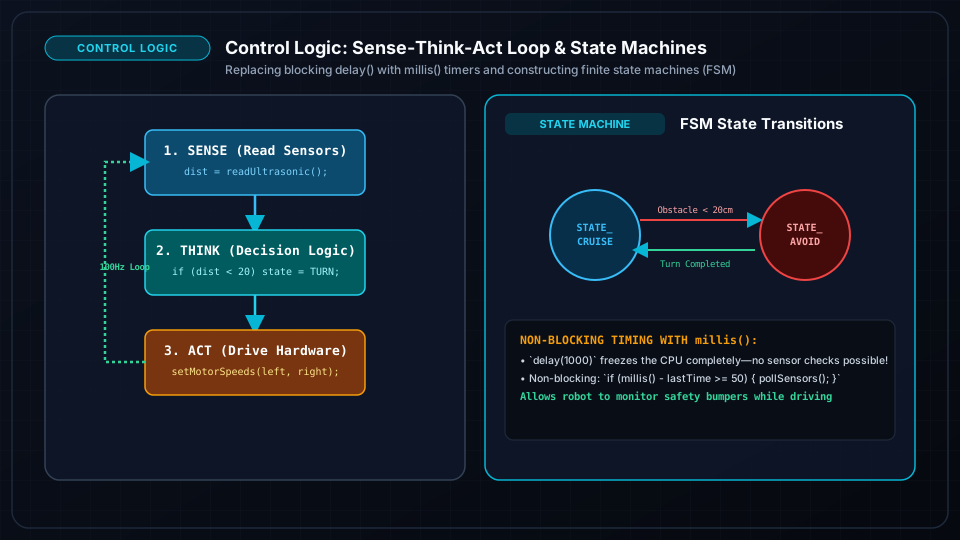
The Sense → Think → Act Architecture
Every high-reliability autonomous vehicle divides its software into 3 distinct stages inside loop():
- 1SENSE: Read all inputs (sonar distance, line sensors, battery voltage, radio packets) and store clean values into variables.
- 2THINK: Evaluate the current state, compare sensor thresholds, and determine the next action (State Machine transition).
- 3ACT: Apply the calculated PWM speeds to motor drivers, set servo angles, and update status indicator LEDs.
Mastering Non-Blocking Timing with millis()
Instead of pausing with delay(), we check a software wristwatch using millis():
unsigned long previousSensorMillis = 0;
const unsigned long SENSOR_INTERVAL = 50; // Read sensors every 50ms (20 Hz)

unsigned long previousBlinkMillis = 0;
const unsigned long BLINK_INTERVAL = 500; // Blink LED every 500ms
bool ledState = false;

void loop() {
  unsigned long currentMillis = millis();

  // Task 1: Non-blocking Sensor Reading
  if (currentMillis - previousSensorMillis >= SENSOR_INTERVAL) {
    previousSensorMillis = currentMillis;
    readAllSensors(); // Fast non-blocking measurement
  }

  // Task 2: Non-blocking Heartbeat LED
  if (currentMillis - previousBlinkMillis >= BLINK_INTERVAL) {
    previousBlinkMillis = currentMillis;
    ledState = !ledState;
    digitalWrite(LED_PIN, ledState);
  }

  // Task 3: Real-time Motor Control Logic runs continuously!
  executeMotorControl();
}
Finite State Machines (FSM): Clean Decision Trees
An FSM organizes robot behavior into mutually exclusive states:
- STATE_CRUISING: Moving forward while checking for obstacles.
- STATE_AVOIDING: Stopping and reversing away from an obstacle.
- STATE_TURNING: Rotating on the spot to find a clear path.
- STATE_BLOCKED: Trapped in a dead end; sounding buzzer alarm.
enum RobotState {
  STATE_CRUISING,
  STATE_AVOIDING,
  STATE_TURNING,
  STATE_BLOCKED
};

RobotState currentState = STATE_CRUISING;
unsigned long stateStartTime = 0;
Complete Production FSM Obstacle-Avoider Code
#include <Arduino.h>

enum RobotState {
  CRUISING,
  BACKING_UP,
  TURNING_SEARCH
};

RobotState state = CRUISING;
unsigned long stateTimer = 0;
float currentDistance = 100.0;

void setup() {
  initMotorPins();
  initSensorPins();
  Serial.begin(115200);
}

void loop() {
  // 1. SENSE
  currentDistance = getUltrasonicDistance();

  // 2. THINK & ACT (Finite State Machine)
  switch (state) {
    case CRUISING:
      if (currentDistance < 20.0) { // Obstacle within 20cm!
        setMotors(0, 0);            // Stop immediately
        stateTimer = millis();
        state = BACKING_UP;
        Serial.println("State -> BACKING_UP");
      } else {
        setMotors(180, 180);        // Cruise forward smoothly
      }
      break;

    case BACKING_UP:
      setMotors(-150, -150);        // Reverse straight back
      if (millis() - stateTimer >= 600) { // Reverse for 600ms
        stateTimer = millis();
        state = TURNING_SEARCH;
        Serial.println("State -> TURNING_SEARCH");
      }
      break;

    case TURNING_SEARCH:
      setMotors(-160, 160);         // Spin turn right
      if (millis() - stateTimer >= 450) { // Turn for 450ms (~90 degrees)
        if (currentDistance > 30.0) {     // Path is clear!
          state = CRUISING;
          Serial.println("State -> CRUISING (Path Clear)");
        } else {
          stateTimer = millis();          // Continue turning another 450ms
        }
      }
      break;
  }
}
Frequently Asked Questions
What happens when millis() overflows back to zero after 50 days?
In C++, unsigned 32-bit integer subtraction (currentMillis - previousMillis >= interval) naturally handles timer rollover with zero bugs! As long as you always subtract previousMillis from currentMillis using unsigned long variables, your timing logic will never glitch.
How do I add a pause button to my State Machine?
Simply add a new state enum STATE_PAUSED. In your main switch-case, if a button press is detected, save the previous state and switch to STATE_PAUSED, which commands motor speeds to zero until the button is pressed again.