Key Engineering Takeaways
- •Arduino Uno/Nano (ATmega328P) is the ultimate beginner platform due to indestructible 5V logic, massive community tutorials, and breadboard convenience.
- •ESP32 is the undisputed king of connected robotics, offering dual 240MHz 32-bit cores, integrated Wi-Fi + BLE, and vast memory for under $5.
- •Raspberry Pi Pico (RP2040) is exceptionally fast (133MHz dual-core) with unique Programmable I/O (PIO) hardware state machines for custom robotics protocols.
- •BBC micro:bit is ideal for younger learners and classroom STEM with its built-in LED matrix, buttons, accelerometer, and block-based MakeCode support.
- •Always check logic levels: connecting a 5V sensor output directly to a 3.3V GPIO on ESP32/Pico will damage the microcontroller without a level shifter or resistor divider.
- • Basic understanding of robot subsystems
- • USB Cable (Type-B, Mini-B, Micro-USB, or USB-C depending on board)
- • Computer with Arduino IDE or Thonny installed
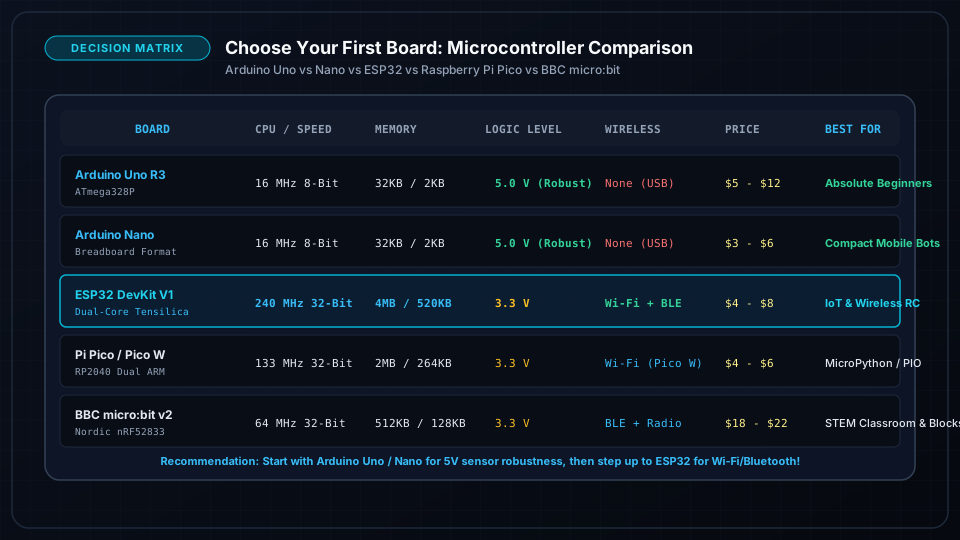
Complete Robotics Microcontroller Comparison Matrix
Choosing the right microcontroller board sets the foundation for your robot's capabilities, budget, and expansion possibilities:
| Feature / Spec | Arduino Uno R3 | Arduino Nano V3 | ESP32 DevKit V1 | Raspberry Pi Pico (RP2040) | BBC micro:bit V2 |
|---|---|---|---|---|---|
| CPU Architecture | 8-bit AVR | 8-bit AVR | 32-bit Dual Xtensa | 32-bit Dual Cortex-M0+ | 32-bit Cortex-M4 |
| Clock Speed | 16 MHz | 16 MHz | 240 MHz | 133 MHz | 64 MHz |
| Flash Memory | 32 KB | 32 KB | 4 MB - 8 MB | 2 MB | 512 KB |
| SRAM (RAM) | 2 KB | 2 KB | 520 KB | 264 KB | 128 KB |
| Operating Voltage | 5V Logic | 5V Logic | 3.3V Logic | 3.3V Logic | 3.3V Logic |
| Digital GPIO Pins | 14 (6 PWM) | 14 (6 PWM) | 28+ (16 PWM) | 26 (16 PWM) | 19 edge pins |
| Analog Inputs | 6 (10-bit) | 8 (10-bit) | 18 (12-bit) | 3 (12-bit) | 6 shared |
| Wireless | None | None | Wi-Fi + BLE 4.2 | Pico W (Wi-Fi/BLE) | Bluetooth 5.0 + 2.4G Radio |
| Breadboard Friendly? | No (Header sockets) | Yes (DIP-30) | Yes (DIP-30/38) | Yes (DIP-40) | Needs Edge Breakout |
| Typical Cost | $4 clone / $25 orig | $3 - $5 | $4 - $6 | $4 - $6 | $15 - $20 |
Board-by-Board Strengths & Weaknesses
1. Arduino Uno & Nano (The Proven Classroom Standard)
- Strengths: 5V tolerant pins can handle accidental wiring slips; millions of forum answers and plug-and-play libraries for every standard module.
- Weaknesses: 2KB RAM severely limits complex math, audio, or buffer arrays; no onboard wireless connectivity.
- Best For: 2WD obstacle avoiders, line followers, simple servo arms, and absolute first-time electronics learners.
2. ESP32 DevKit (The IoT & Wireless Powerhouse)
- Strengths: Dual 240MHz cores allow running a web server on Core 0 while executing real-time motor control loops on Core 1; native Wi-Fi/Bluetooth means you can drive your robot from a smartphone browser without extra shields.
- Weaknesses: 3.3V logic requires attention when interfacing 5V legacy sensors; ADC analog reading can be non-linear near 0V and 3.3V.
- Best For: Wi-Fi/Bluetooth smartphone-controlled rovers, telemetry logging, IoT home robots, and camera-equipped rovers (ESP32-CAM).
3. Raspberry Pi Pico / Pico W (The Maker's Precision Engine)
- Strengths: Incredibly cheap for dual-core 133MHz ARM performance; official MicroPython and C/C++ SDK support; Programmable I/O (PIO) hardware handles custom bit-banging without loading the main CPU.
- Weaknesses: Fewer built-in analog ADC channels (3 usable); no built-in EEPROM (uses flash emulation).
- Best For: Quadruped walking robots, precise multi-axis stepper drivers, MicroPython-based robotics education.
4. BBC micro:bit V2 (The K-12 STEM Favorite)
- Strengths: Built-in 5x5 LED display, microphone, speaker, compass, accelerometer, and touch sensor; programmable via graphical drag-and-drop MakeCode blocks.
- Weaknesses: Edge connector requires an expansion shield to easily wire standard breadboards or motor drivers.
- Best For: Elementary and middle school robotics clubs, interactive wearable robots, quick proof-of-concept experiments.
Crucial Concept: 5V vs 3.3V Logic Levels
A critical hurdle when selecting boards is Logic Level Compatibility:
- 5V Logic (Arduino Uno/Nano): HIGH = 3.5V to 5.0V; LOW = 0V to 1.5V.
- 3.3V Logic (ESP32, Pi Pico, micro:bit): HIGH = 2.0V to 3.3V; LOW = 0V to 0.8V.
[ 5V Sensor Output (e.g. HC-SR04 Echo) ] ───> [ 1kΩ Resistor ] ───┬───> [ ESP32 3.3V GPIO ]
                                                                   │
                                                            [ 2kΩ Resistor ]
                                                                   │
[ GND ]Decision Guide: Which Board Fits Your Project?
Follow this simple decision tree:
- 1Are you brand new to coding and want zero headaches? → Choose Arduino Uno / Nano.
- 2Do you want to control your robot from a phone or web dashboard? → Choose ESP32.
- 3Do you prefer coding in Python / MicroPython? → Choose Raspberry Pi Pico W.
- 4Is this for elementary school or visual block coding? → Choose BBC micro:bit.
Frequently Asked Questions
Can I program an ESP32 using the Arduino IDE?
Yes! The ESP32 is fully supported in the Arduino IDE. You simply add the official Espressif board manager URL in Arduino IDE Preferences and install the "esp32" package. You can then write standard C++ Arduino code with familiar setup() and loop() functions.
What is the difference between Arduino Uno and Arduino Nano?
They share the exact same ATmega328P microcontroller chip, clock speed (16MHz), and memory (32KB). The only difference is the physical form factor: the Uno uses socket headers, while the Nano is small and has breadboard-friendly pins, plus 2 extra analog inputs (A6 and A7).